CloudFiles has saved us many hours of repetitive work and boosted our productivity. It has taken our automation capabilities to new heights! Definitely recommended.
Jeremy AhoyoAtlante

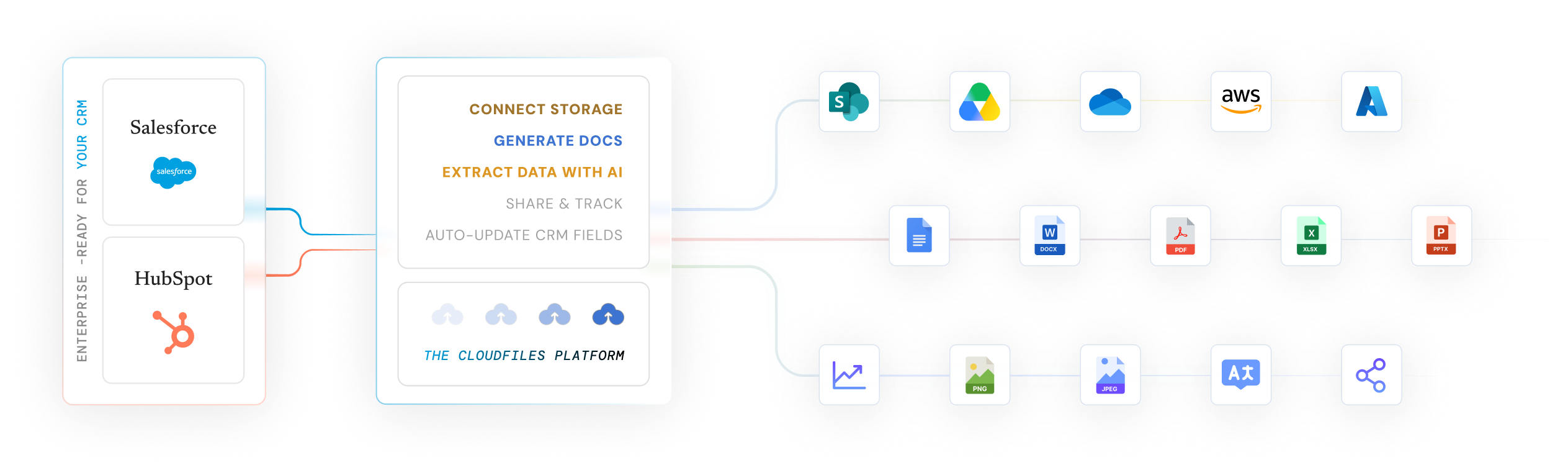
Manage every file on the record without using CRM storage. Generate documents from live data, extract data with AI, and automate workflows in Salesforce and HubSpot.


















Choose between Salesforce & HubSpot

Connect SharePoint, S3, Google Drive etc., and see every file right on the record. Generate documents from live Salesforce data, share trackable links, and extract document data straight into your fields with AI. Automate it all with Flows.

Bring documents into your HubSpot workflows without leaving the deal. Store files in your own cloud, auto-generate proposals and contracts from deal data, and track every open and download right on the record. Built for how your pipeline actually moves.
Three best-in-class products. One platform. Native for Salesforce and HubSpot.

Connect SharePoint, S3, Google Drive to your CRM, surface every file on the record, and share trackable links, without using CRM storage.

Extract data from documents with AI, then write it straight into your CRM fields.

Generate on-brand documents from live CRM data, then send for e-signature.
Salesforce teams managing millions of documents every day
220+ reviews on the Salesforce AppExchange
Faster document processing with AI
Lower Salesforce storage costs
Six risks every enterprise Salesforce and HubSpot team runs into: cost, sprawl, and lost control.

Salesforce native storage runs about $5/GB per month, 10 to 20 times more than SharePoint or Amazon S3. CloudFiles keeps files external and cuts storage costs by up to 75%.

Most teams juggle 3 to 5 disconnected tools for storage, generation, and sharing. CloudFiles replaces all of them with one connected platform.

Once a document leaves the CRM, most teams lose sight of it. CloudFiles tracks every open, download, and interaction on the record.

Teams burn hours copying data from PDFs and invoices into CRM fields by hand. CloudFiles' AI extracts it and updates records automatically.

Manual formatting and copy-pasting can turn one document into a two-hour job. CloudFiles generates it instantly from your templates and live data.

Files stored outside the CRM usually have no audit trail. CloudFiles logs every action, supporting your own SOC 2, GDPR, and HIPAA obligations.
Document Management, AI, and generation in a single governed platform, instead of stitching separate storages and tools.
CloudFiles works directly with SharePoint, Google Drive, OneDrive, and Amazon S3. Your files stay in your own storage — CloudFiles never re-hosts them — and are not used to train our AI models.
Use Salesforce Flow, Apex, and APIs to automate document creation, filing, extraction, approvals, and sharing, without adding engineering overhead.
Extract, classify, verify, and sync document data directly into Salesforce. Reduce manual data entry by up to 80% and process documents up to 4× faster.
Trusted by 1,200+ Salesforce teams managing millions of documents every day. Leading Salesforce-SharePoint integration solution.
Protect every document workflow with independent SOC 2 Type II auditing, ISO 27001 certification, and HIPAA and GDPR compliance, granular permissions, complete audit trails, and customer-controlled storage.
CloudFiles connects your storage (SharePoint, Google Drive, OneDrive, Dropbox, S3) directly to your CRM, without copying files into your CRM. When a feature needs to read a file (Document AI, document generation, or the viewer), CloudFiles processes the content in your chosen region and doesn't retain it after the request completes. Nothing is re-hosted or stored.
CloudFiles streamlines and automates document workflows for regulated industries — inside Salesforce and HubSpot.
Collect, verify, and manage KYC, loan, and client documents directly from Salesforce or HubSpot. Automate document workflows, share files securely, and track client engagement while supporting financial-services compliance.
Manage patient, claims, clinical, and regulatory documents from your CRM while keeping sensitive files protected. Automate document collection, extraction, sharing, and approvals with enterprise-grade security and HIPAA-ready workflows.
Manage technical specifications, contracts, proposals, onboarding files, and support documents from one connected CRM experience. Automate document creation, organization, sharing, and tracking to reduce manual work and keep teams aligned.
How our top customers actually use CloudFiles, every day.

Keep files in SharePoint and cut Salesforce storage costs by up to 75%, without moving a single file out of your CRM view.

Go beyond basic external file access with advanced document automation, folder creation, configurable permissions, metadata management, and a more connected Salesforce experience.

Use Document AI to classify documents, extract and validate key information, and create or update Salesforce records automatically.

Turn live Salesforce or HubSpot data into branded documents, send for e-signature or store in external storage.

Create secure, trackable links with granular permissions, expiry controls, and detailed engagement insights for every open, view, and download.

Use Salesforce Flow, APIs, and Apex to create folders, organize files, generate documents, extract data, and trigger actions from CRM updates.
CloudFiles is independently audited for SOC 2 Type II, certified to ISO 27001, and compliant with HIPAA and GDPR. Data residency is supported in the US, EU, UK, and AU. Your files stay in your own storage — CloudFiles never re-hosts them — and are not used to train our AI models.



Real reviews from Salesforce & HubSpot teams using CloudFiles every day.
CloudFiles has saved us many hours of repetitive work and boosted our productivity. It has taken our automation capabilities to new heights! Definitely recommended.
CloudFiles is an excellent, easy-to-use app. It quickly solved our Salesforce to SharePoint file transfer crisis with seamless implementation and outstanding customer support. Highly recommend!
CloudFiles' SharePoint integration with Salesforce has reduced data storage costs, simplified document management, and enhanced efficiency. Outstanding support. Highly recommend for reducing storage expenses.
CloudFiles offers great value for connecting storage solutions. Automate tasks like folder creation and file copying. Excellent support at no extra cost. Highly recommend!
Flawless app with exceptional support. CloudFiles exceeds expectations in testing, implementation, migration, and automation. Highly recommend exploring this solution for connecting file storage to Salesforce
CloudFiles is incredibly robust and handles our document processes flawlessly. The highly responsive team are true problem solvers. Worth every dollar. Absolutely recommend for Salesforce.
CloudFiles' SharePoint/Salesforce integration is excellent. The team is collaborative, responsive, and highly knowledgeable. They go the extra mile to meet our needs. Highly recommend.
CloudFiles seamlessly integrates OneDrive with Salesforce, offers flexible Apex actions, and provides outstanding support. Vishesh and team ensured a smooth setup and file migration.
Using CloudFiles' SharePoint integration with Salesforce has saved us on data storage costs. Their support and flow templates for file permissions are excellent. Highly recommended!
CloudFiles is a leading enterprise-grade document management, generation, and AI-powered data extraction platform for Salesforce and HubSpot. It connects CRM records with external storage platforms such as SharePoint, OneDrive, Google Drive, Box, Dropbox, and Amazon S3, enabling businesses to access, manage, generate, share, and process documents directly from their CRM while keeping files securely stored in their existing storage.
CloudFiles is a leading Salesforce–SharePoint integration solution on Salesforce AppExchange. It connects SharePoint document libraries directly to Salesforce records, allowing users to access, upload, preview, organize, and share files without leaving Salesforce. Files remain stored in SharePoint, helping reduce Salesforce storage usage while preserving folder structures, permissions, metadata, and governance. Teams can also automate folder creation, file organization, naming, and sharing using Salesforce Flow.
CloudFiles is a focused document platform that combines management, AI, and generation natively in Salesforce and HubSpot. It is the #1-rated document management app on the AppExchange, holds a 4.9-star rating, and is trusted by 1,200+ Salesforce teams.
By keeping files in your own external storage instead of Salesforce, CloudFiles lowers Salesforce file storage costs by up to 75% while still surfacing every file on the record. Salesforce native storage costs about $5/GB per month, well above SharePoint or Amazon S3.
Yes. CloudFiles merges live CRM data into on-brand templates to create quotes, contracts, proposals, and invoices instantly, cutting document creation time by around 50%, with e-signature support.
CloudFiles Document AI is an enterprise-grade intelligent document processing solution for Salesforce. It uses AI and adaptive OCR to read PDFs, Office files, images, scanned documents, and handwritten content, then extracts, validates, and maps the data directly to Salesforce fields, lookups, picklists, and related records. Its no-code Document Mapper can create or update parent and child records, while Flow actions automate document processing, querying, and splitting. Unlike MuleSoft IDP, which primarily returns extracted data as JSON or an Apex class that must then be mapped through Salesforce Flow, CloudFiles can turn documents directly into connected Salesforce records. It also automatically selects the appropriate AI model and processing strategy for each task, without requiring teams to configure and maintain individual models.
Yes. CloudFiles is built for enterprise Salesforce and HubSpot teams, with granular permissions, full audit trails, data-residency options, and deployment across multiple orgs. It is independently audited for SOC 2 Type II, certified to ISO 27001, and compliant with GDPR and HIPAA, and is trusted by teams at Commvault, General Mills, PenFed, Aviva and more.
Manage, generate, extract, and automate documents without changing where your files are stored. Join 2,000+ teams already using CloudFiles.
We use cookies to run this site, understand how it is used, and measure our marketing. You choose what we may use. Read our Cookie Policy.
Choose which categories we may use. You can change this any time from “Cookie preferences” in the footer.
Required for the site to work — page delivery, security and bot protection on our forms (Cloudflare Turnstile), and remembering this cookie choice. These never store marketing identifiers and cannot be switched off.
Helps us understand which pages are useful, so we can improve them. Google Analytics 4 and Google Tag Manager (Google Ireland Ltd).
Powers our live chat so you can talk to us and we can keep your conversation history. Gist (Gist Applications Inc). You can always start a chat without this — we load it only when you click.
Lets us measure our advertising and reach people who have shown interest in CloudFiles. LinkedIn Insight Tag (LinkedIn Ireland), Google Ads (Google Ireland Ltd), and — outside the EEA/UK — ZoomInfo WebSights (ZoomInfo Technologies LLC).